Category: Windows 7 (Page 4 of 7)

Windows 10 the last Windows to be produced? My take on it inside

Hey there you guys. I hope you are having a good day
As I try to pace myself and post only once a day. But news like this make me break my rules. As I continue to bring the latest update about Windows 10
“Windows to stop producing Windows versions”!! Source
After we confirmed the bold statement. Let’s take a look at what it means?

If you thought that Windows XP overstayed it’s welcome.Think again!! after XP there was Vista, 7 and of course Windows 8. And it’s support finally ended in April of 2014. Windows 10 is here to stay apparently. With the company stating that There won’t be a Windows 11. According to the statement. Windows is pushing a new business model that has me feeling my pocket already! What do we know so far is that Windows 10 will be free for all as an update for one year. And that your license has to be genuine. And how the updates will be delivered. It’s supposed to come sometime this year.
Question is:  

How will Microsoft make it’s money if it doesn’t force us to upgrade every three years? (Opinion piece)

I have some speculations based on what Microsoft has released so far.

    1. Users who will install Windows 10 fresh will have to pay a full license fee.
    2. Users who have pirated versions of Windows will have to pay a full license fee to remove version restrictions.
    3. Users who want to have the free upgrade will have to buy a license (if not already genuine) of an older version: 7, 8 etc ..
    4. Upgrades will not be free (You will pay for updates and upgrades).
    5. I am sensing a none Microsoft block (As in Surface tablets) You have to run genuine Microsoft software, or you are stuck with an over priced child-pad!! (Confirmation needed on the Surface tablet bit).
    6. Perhaps do what Adobe does with the creative cloud and what Microsoft is already doing with Office356.
    7. I think Windows will be more Xbox Live! (Pay wise of course)!!

      I believe that Microsoft will gain a lot more than selling standalone versions of it’s software, things like:

        1. Limits Piracy.The new licensing system makes it more difficult for pirates to “crack” versions as it’s upgraded regularly.
        2. More money
          Some people like to pay 20$ a month rather than 300$ at once.
        3. More focused development.
          Instead of coming up with a marketing scheme every 2-3 years. They get to focus on one system. While still making money out of it.
        4. Easier support.
          When enough people migrate to Windows10. Support will be so much easier.
          As I said. These points are of my current perspective based on the information I have now! And my final verdict is to wait until Microsoft unveils it’s plans!
          Have a lovely day dear fans. Let me know what you have to say in the comments section below!
          Recover some files after a Chkdisk. The easy way

          Hey there you guys. How are you doing today?

          You inserted a USB drive to your computer. And you were asked to do a check ( and with Windows 8 that happens with all USB’s!!) And when you checked there were errors and files recovered! Is that bad?

          Not really. That can be a really good thing!

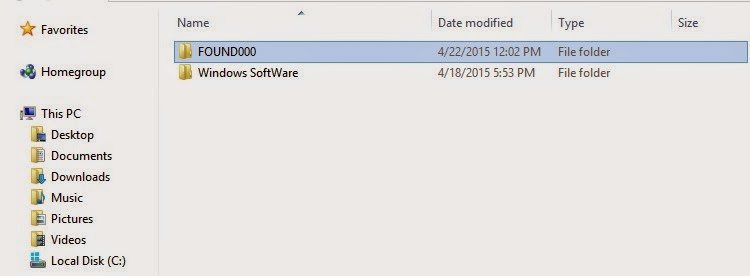
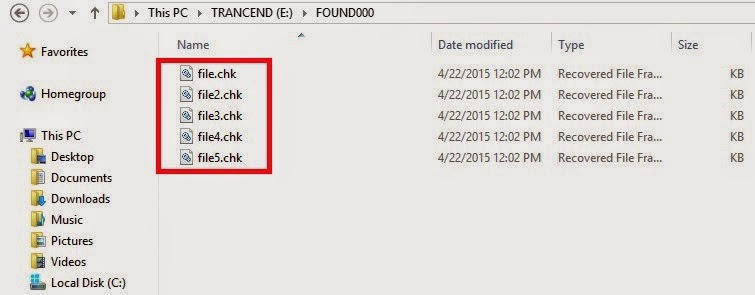
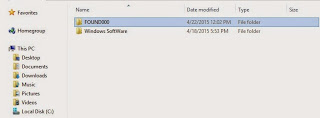
          When the check is completed (depends on drive size and files in question) you will find the FOUND.000 folder. With plenty of .CHK files. So far so good!

          Depending on the file sizes of the check files you might be able to restore the data.

          If it’s in the same size as your lost data then you are in luck.

          Just log into Linux and you will see then in thumbnails of the same type. All you have to do is to rename them to get them to work!

          Pretty easy huh?

          I found out a strange thing. That some of the web pages I downloaded in Linux are often lost when I boot to Windows. Because the names of the files and folders contain elements not allowed in Windows like “/“ and “?”.

          In a next post I will be talking about fixing the empty but full drive with no format included!

          I hope you found this post useful. Please comment below and let me know what you think?

          What’s registry defrag and how often do you need to do it?

          Hey there you guys, how are you today?

          Today we are going to talk about registry defragging. And what benefits it may bring you?
          It’s very similar to normal defragging. Instead of working with files and folders. It works inside the registry
          Over a long period of time the registry becomes clustered with useless keys and unused values. Which affects the overall system performance.


          It’s pretty safe to do with the right tool. Ainvo Registry Defrag is an easy to use tool and really effective. It’s free for non-commercial use. So make sure to check the license before getting to work! It’s compatible with Windows XP, Vista and 7. Useless on Windows 8 / 8.1 (Trust me. I tried it several times).

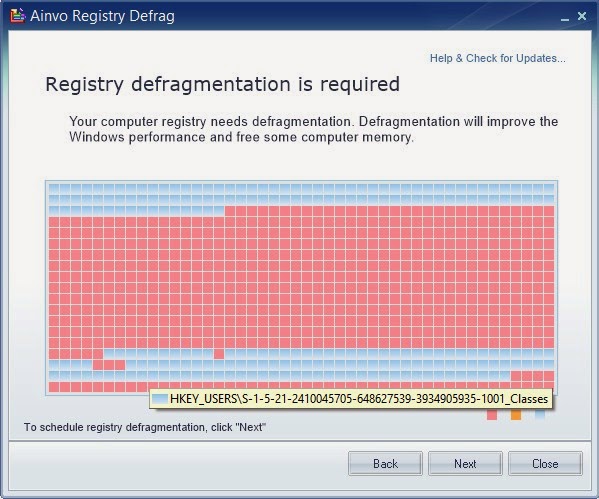
          The tool itself is pretty straight forward. It’s a wizard that calculates the registry defragment. If you don’t need defragment it will tell you so.At first it will run an analysis of the system to determine how fragmented is the registry. As you can see here it’s pretty fragmented!

          You need to reboot for it to work. When you reboot a black screen will appear (Don’t be scared!!) and you will see the progress. Then you have to reboot again to the system.
          The reason is: It cannot work on the system files while they are in use. It works outside of windows (Pre-boot).

          Then after the second reboot you are shown the defrag results in your default browser.
          The detailed results show where the tweaks were made and the sizes before and after.


          Feel free to check it out and give your system an overhaul.
          Now I must warn you: Don’t attempt to do anything to the registry on your own, unless you know exactly what you are doing, it can cause some serious damage to your system.
          I hope you enjoyed this post and found it useful. Feel free to comment below!
          Also join my blog and subscribe to mailing list so you don’t miss a post!

          Doesn’t work on Windows 10.

          Windows 10 FREE FOR ALL!! What’s the catch?!

          Hey you guys! I have some breaking news!!

          Windows 10 will be launched this summer. Free for all Windows machines ( Genuine and pirated!) Running Windows 7, 8.1 And it will be available in 190 countries and in 111 languages!

          New browser 

          They also plan on retiring the famous Internet explorer and to replace it with a new web-browser!

          More on the story as it develops!

          Sources: 1, 2

          Opinion piece

          Since when does Microsoft give anything for free? Wouldn’t this be a trick to bust all the pirated users of Windows?

          I’d say to wait and see how this develops. And don’t use pirated software!

          « Older posts Newer posts »